
AgentDB9 - AI agent Workspace
Developed a containerized AI-powered coding environment featuring a browser-based VS Code IDE, multi-provider LLM integration, semantic code search, and a scalable microservices architecture.
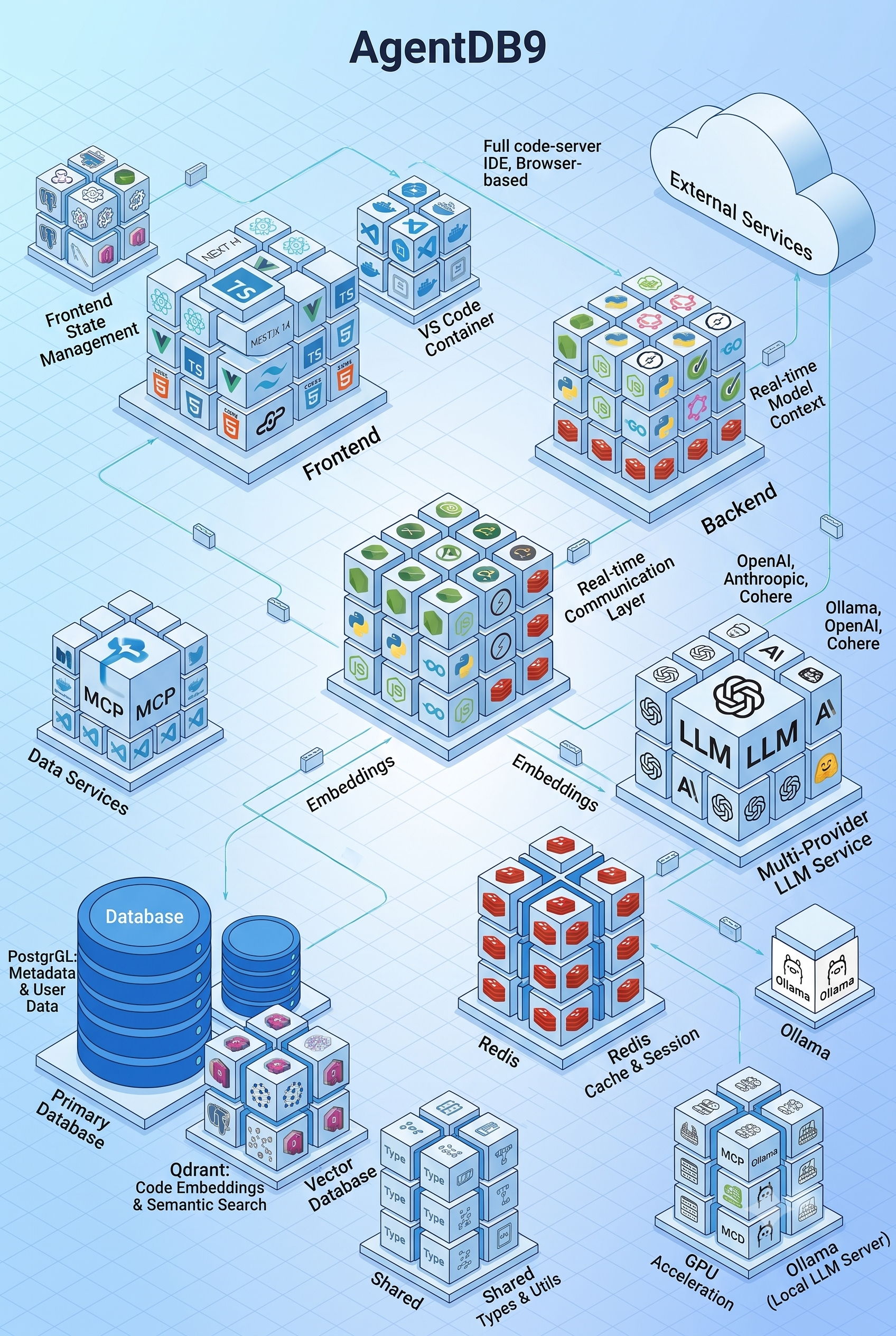
AgentDB9 — Building a Coding Agent, Not Just an AI Chat
AI coding tools are often presented as a chat interface layered on top of an editor. I wanted to explore what happens when the problem is treated differently: what would it take to build the development environment around the agent itself?
That led to AgentDB9, a containerized coding-agent environment that combines an AI orchestration layer, a browser-based VS Code workspace, MCP-based tool execution, multiple LLM providers, semantic code search, and real-time communication into one system.
The project is built as a set of independently deployable services rather than a single application.
From Chat to an Operating Environment
The central idea was simple: an agent becomes significantly more useful when it can see the project, understand its context, use development tools, and observe the results of its actions.
AgentDB9 therefore separates the system into several responsibilities:
- Next.js + TypeScript — application UI and workspace experience
- Node.js + Express — API gateway and orchestration
- Socket.IO + Redis — real-time communication and session infrastructure
- LLM service — provider abstraction and model orchestration
- MCP server — tool execution layer for the agent
- code-server / VS Code — complete browser-based development environment
- Ollama — local model inference
- Qdrant — vector storage and semantic code search
- PostgreSQL — application and project metadata
- Shared TypeScript packages — common contracts between services
This separation keeps the agent, models, editor, and infrastructure independently evolvable.
Giving the Agent Hands
The most important architectural decision was introducing Model Context Protocol (MCP) as the bridge between the AI and the development environment.
Instead of asking the model to simply return code, the MCP layer exposes tools for operations such as:
- creating and editing files
- navigating project files
- executing terminal commands
- interacting with Git
- running tests
- formatting code
- scaffolding projects
- managing dependencies
The repository currently exposes 67+ tools through this layer, with sandboxed operations and input validation.
This changes the interaction model considerably.
The agent can move from:
Prompt → Generated code
to:
Understand → Plan → Execute → Observe → Test → Iterate
That is much closer to how an engineer actually works.
Putting the IDE in the Browser
The development environment itself runs through a containerized VS Code/code-server workspace.
Rather than building a custom editor, AgentDB9 uses the existing VS Code ecosystem and integrates it with the application through an authenticated proxy. The workspace includes the editor, terminal, Git tooling, debugging, extensions, and project configuration.
The result is a development environment where the developer and the agent operate on the same project and workspace.
The system also exposes agent activity directly in the workspace, including file changes, terminal commands, test execution, and other operations.
This makes AI actions observable instead of turning the agent into a black box.
Context Is More Than Conversation History
A coding agent needs considerably more context than the latest chat messages.
AgentDB9 maintains contextual information around:
- project structure and dependencies
- the active file and cursor position
- recent changes
- Git history
- coding conventions
- existing tests and patterns
Qdrant is used for code embeddings and semantic retrieval, providing the foundation for retrieving relevant project context when the agent needs it.
The goal is to make the agent reason about the actual codebase, rather than generating code in isolation.
Treating Models as Replaceable Infrastructure
Another design decision was avoiding a hard dependency on a single LLM provider.
The LLM service supports local and external providers, including Ollama, OpenAI, Anthropic, Cohere, and Hugging Face. Model selection can take into account task type, complexity, performance, cost, and availability.
This also enables fallback chains.
If one model is unavailable or unsuitable for a task, another model can take over. Local models can therefore act as both an alternative and a fallback to hosted models.
That abstraction is important because the model itself becomes only one component of the system rather than the system's foundation.
Real-Time Agent Interaction
Because agent operations can take time, the architecture uses WebSockets for real-time communication between the workspace, backend, and agent.
This enables developers to see operations as they happen instead of waiting for a final response.
The same infrastructure supports collaborative features such as user presence, shared cursors, workspace sharing, activity broadcasting, and real-time chat.
The result is a model of human + AI collaboration, rather than AI replacing the developer's workspace.
Containerizing the Entire Stack
One of the harder parts of the project is that an AI coding agent needs access to a surprisingly large amount of infrastructure.
The environment therefore runs as multiple Docker services, including the application, backend, LLM service, MCP server, VS Code workspace, Ollama, Qdrant, PostgreSQL, and Redis.
Docker Compose handles orchestration while shared TypeScript types keep service contracts aligned. The development workflow also supports hot reload, API-first communication, Jest testing, linting, and service-specific development commands.
The repository also includes separate configurations for different environments and hardware capabilities, including GPU-oriented setups for local model inference.
Performance Is Part of the Architecture
Running local LLMs alongside a browser IDE, vector database, relational database, cache, and multiple application services can become resource-intensive very quickly.
AgentDB9 therefore treats resource management as part of the system design.
The Docker configuration defines service-level CPU and memory limits, log rotation, Redis eviction, and Ollama concurrency/model-loading parameters. The repository also includes tooling for Docker storage management and diagnostics.
This was important because an AI development environment isn't useful if the infrastructure supporting the agent becomes the bottleneck.
What I Took Away
The most interesting part of AgentDB9 wasn't any individual AI model. It was understanding that an effective coding agent is fundamentally a systems problem.
The model is only one component.
A useful agent needs:
Context to understand the codebase
Tools to change and inspect it
Execution to validate its decisions
Memory to retain useful project information
Real-time feedback to make its actions observable
Isolation to safely execute operations
Model abstraction to avoid coupling the system to one provider
AgentDB9 was my exploration of putting those pieces together into a single development environment.
It combines frontend architecture, distributed services, containerization, real-time systems, developer tooling, LLM orchestration, MCP, semantic search, and local AI inference into one project.
More importantly, it changed how I think about AI-assisted development: the interesting problem isn't making an AI write code. It's building the system that lets an AI participate meaningfully in the software development lifecycle.